Modern tools for teaching and studying vocabulary

Background
As a kid, I had a pretty friendly relationship with the English language. It was by far the part of school that felt most natural, and tended to be easy despite my ADHD. Most subjects required long stretches of concentration that I struggled with, but the rules and components of English tended to click very quickly, and looking back I credit frequent reading at adult levels from a young age. This exposure to the practical use of well-constructed, evocative English language gave me the context needed for the schoolwork to make sense.
What, then, is the outlook for my kid today whose connection with language is overloaded with staccato messaging and absurdist slang? I still urge her to read actual texts by actual authors regularly, and I'm sure it helps. But I also know that an immense portion of her daily communication, both receptive and expressive, are shaped by the medium of the Internet, where she and other kids like her are developing patterns very different than any author whose language I absorbed and imitated growing up.
I'm not about to try and change how much Internet communication she does. Just a few years ago, this was a kid who rarely spoke to anyone. After months of speech therapy trying to coax her into conversation, her therapist suggested facial muscle weakness could be the problem and prescribed exercises with a sort of human chew toy. Unable to get over giving my kid a device that looked like it belonged in the corgis' toy basket, we bowed out of therapy and soon discovered something almost magical: the gaming headset. From the moment she first put it on to play with her friends remotely in Covid lockdown, her interest in speaking began to change. Nowadays, we still struggle to chat at the dinner table, but I find it oddly reassuring to hear her call instructions to her Roblox teammates over voice chat with near-unrecognizable precision and confidence.
So memes, nonsense, and algo-speak are here to stay. But I still want her to love language and realize how empowering it can be, so we have a vocabulary component of our weekly homeschooling plan. I knew this couldn't work exactly like my own study of words as a kid, where I would soak up the thesaurus with intrinsic enthusiasm. My solution acknowledges several learning factors:
- My student needs frictionless practice and immediate feedback.
- Relevance matters - learning things that have no apparent connection to her world are easily lost.
- I'm not a trained teacher, and need tools that allow me to leverage the wisdom of much more experienced educators.
If you feel a system with these priorities would work well for you and your student, what follows is a walkthrough of the specific tools and methods I recommend trying. Note that I use AI and screen-based resources liberally. All suggestions could be adapted to be AI and screen-free, but I present them transparently as I've practiced them.
Kickoff: Research
I recommend the first stop in developing a plan like this should be the Consensus app in ChatGPT, which helps me find peer-reviewed studies and absorb their key points quickly. Ask it some essential questions about the topic and it can help you make initial decisions. For example:
- At what pace should a native English-speaking person try to learn new words in order to expand their vocabulary? - Several studies focused on adult learners suggested not more than 30 new words per week for retention, and I chose 15 to start.
- What methodology is most effective at helping people acquire new vocabulary and retain it? - The studies keep pointing to spaced-repetition memorization for word-learning that sticks, so I planned for study to take place with flash cards.
I also made some personal judgement calls based on a mix of research and knowledge of my student:
- I'll try to have words that align in some way with other subjects we are studying in the week, along with words I think she may find useful in life.
- I'll need to make the study flexible enough not to force her to grind words she already knows. A few easy ones builds confidence, but she’ll get bored quickly if she must practice such words at length. Honestly, I am regularly surprised by words she does and doesn't know, so I don't trust myself to predict which words will be hard or easy, so I need our study system to adapt.
Summarized below, the approach we are currently using tries to incorporate the recent research insights and individual needs of my student with ADHD and autism. Each of the 4 stages of this solution uses a combination of tools intended to save you and your student time and increase the impact of study.
If you want shortcuts to implementing this system, my Supporter Subscribers can access the actual configurations, instructions, and files I’ve developed and iterated on. Consider supporting Pragmatic Homeschooling and getting access to premium extras.
1- Select, define, and write examples for the week's words.
- Who: Teacher
- How: ChatGPT
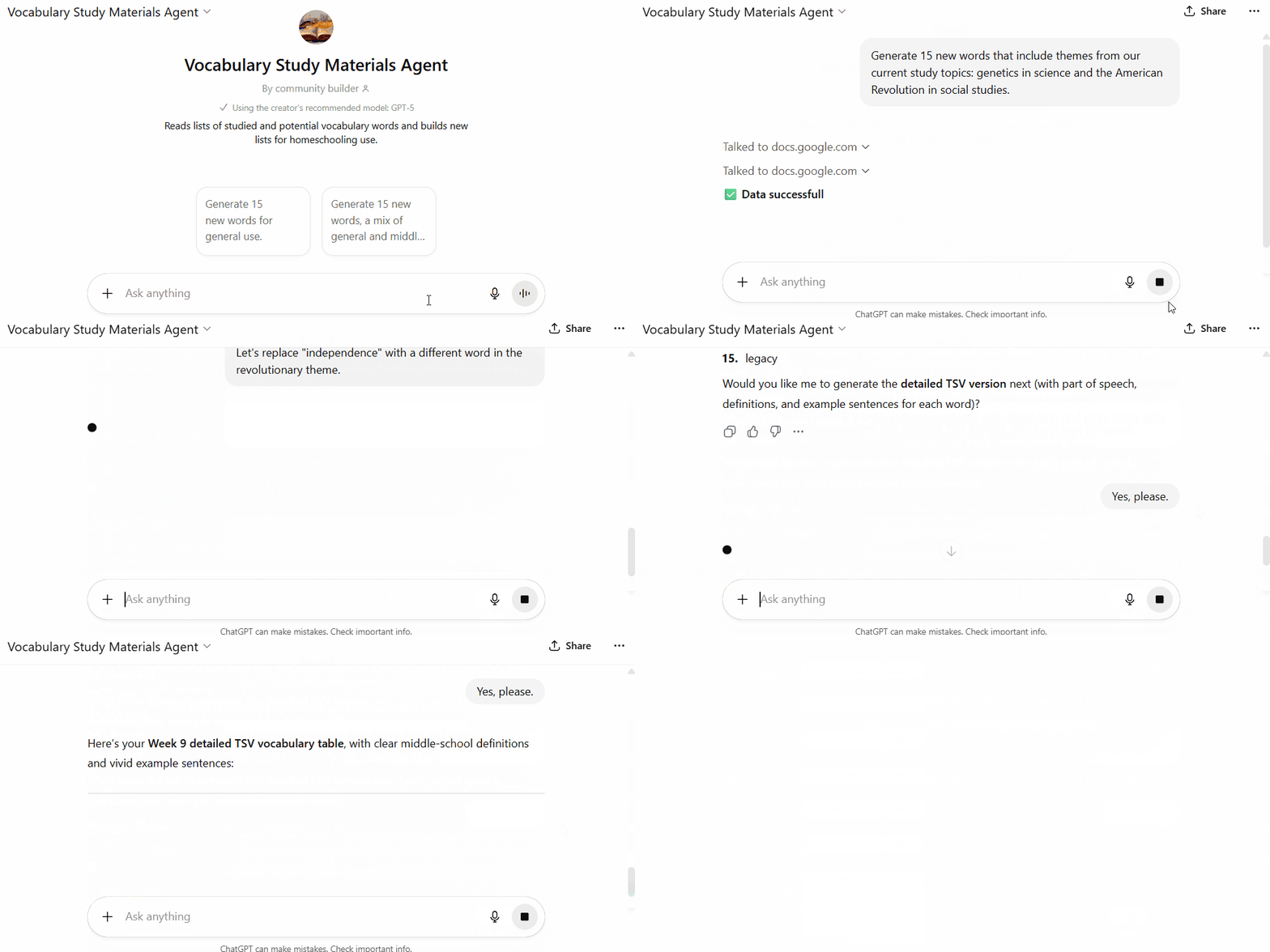
- What: To generate a fresh word list and the definitions and examples we will study, I've set up a custom GPT in ChatGPT which I’ve given a detailed instruction set. For starters, I've set expectations that the words should be appropriate for a 7th grade learner and the definitions and examples should use plain language and context the student is interested in (like video games). I also set up a GPT action to supply the GPT with two reference materials - a list of words we’ve already studied (so that there are no repeats) and a list of appropriate potential words (from a list of most common SAT vocabulary) that can be used as inspiration. I happened to use Google Sheets to host these materials, but you could store them anywhere accessible or even upload directly to the GPT memory. When I chat with this GPT, I indicate how many words I’d like to generate in the new batch, and any themes I would like to focus on. The GPT then uses the reference materials and my input to offer words it thinks are good candidates along with the customized definitions and examples, and I will usually iterate a few times to refine the list and the details.
- Outcomes: Instead of using a premade vocabulary curriculum introducing words unrelated to our current focus, I’m able to tailor every week’s words for relevance. Furthermore, the definitions and example sentences are composed in a way that my student connects with better than we might find in materials written for the “average” student.
- Investment: Custom GPTs may require a ChatGPT subscription. Setup on this custom GPT and the reference materials took hours and involved frustrating excursions into nuances of writing instructions and configuration. However, once set up, the custom GPT is a weekly timesaver I absolutely couldn’t teach personalized vocabulary lessons without. It takes just a few minutes to shape a list that’s aligned and relevant.
- Caveats: ChatGPT is a large language model, so this vocabulary teaching assistant is one of the functions I feel it’s actually best suited for. Using a custom GPT with consistent instructions also allows you to reduce the risk of confusion and derailment that can happen in long chats - indeed, the first version of this system I made was a long project chat that became befuddled and unreliable around 100 messages in. It’s always up to the teacher to catch any bizarre choices the LLM makes before passing the output along to learners, so reserve time to review everything the system generates for accuracy and appropriateness.
2- Load the weekly list into our study app.
- Who: Teacher
- How: ChatGPT and Anki
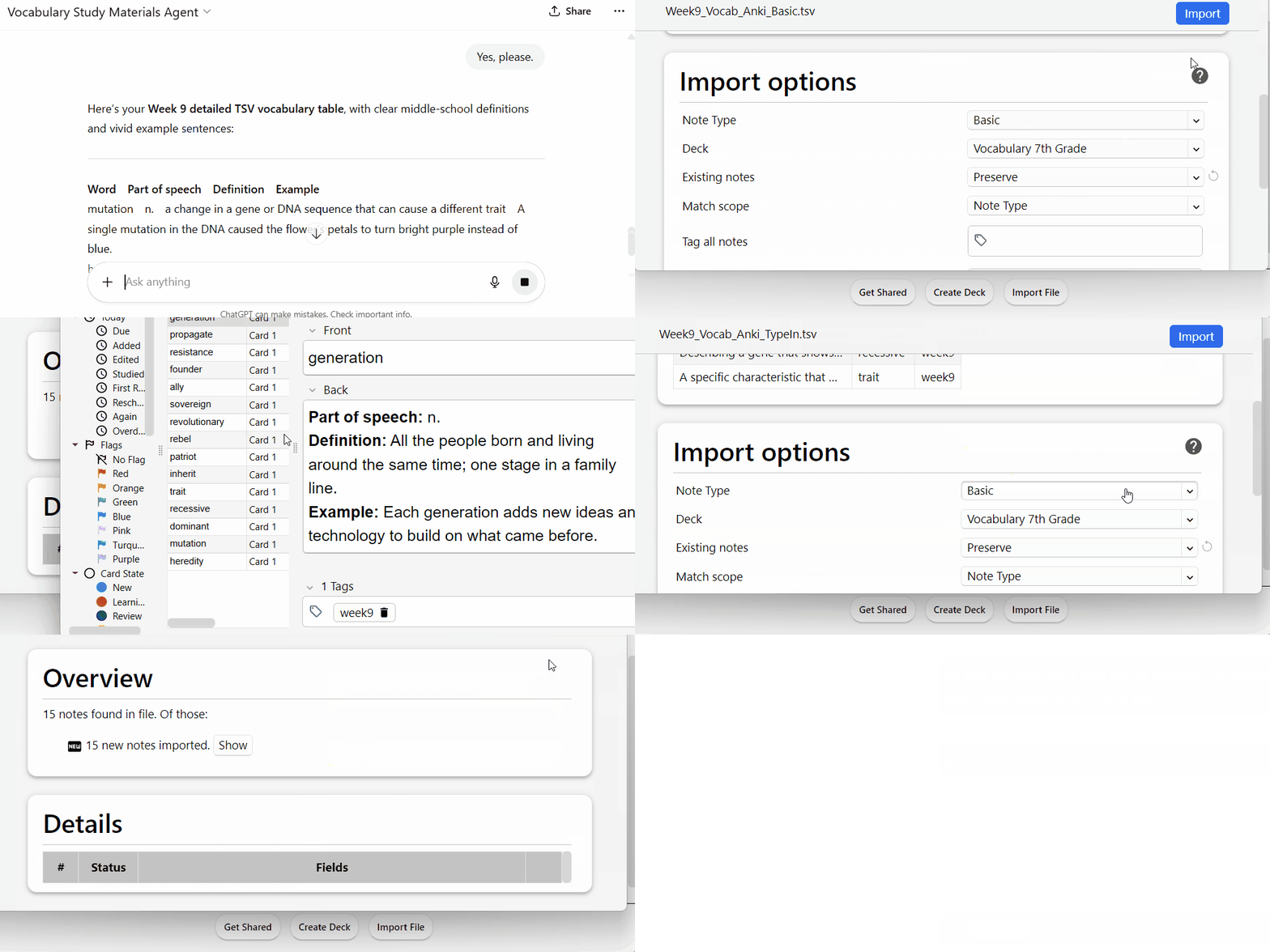
- What: Research in ChatGPT and language learning forums pointed me to the Anki flashcard system, which has a highly respected spaced-repetition algorithm and straightforward interfaces across devices. The custom vocabulary list generation GPT above contains instructions to ultimately output the week's list in Anki-readable TSV formats - both for “basic” flashcard practice (with card front as the word and card back as the definition and usage example) and “type-in” answer quizzing (where only the definition is given on the front of the card, and students type the word they believe matches before the correct word is revealed). I've settled on adding the week's new words as basic flashcards, plus last week's words as type-in quizzes each week to verify progress. When the custom GPT exports the two files for the week, I use the desktop version of Anki to import each one to the corresponding card type and set any tags I want to use (like an identifier for the batch of words) for filtering later. With an Anki Web account, I can then synchronize the import to all locations where kiddo practices (mainly the iPad in her case). Anki integrates newly imported cards to the existing vocabulary deck and schedules study due dates according to our preferences and the underlying spaced repetition algorithm, which adapts to the learner’s feedback on card familiarity in every study session.
- Outcomes: With Anki’s simple, straightforward interface, the vocabulary materials you import are ready to practice on whatever device the student likes to use. As they review vocabulary word cards, they’ll rate how well they know it, and Anki uses the feedback to schedule when it will bring up the card next. Then the type-in cards provide a quick checkpoint on knowledge and spelling accuracy.
- Investment: Again, I recommend a custom GPT to ensure consistent export to Anki’s import flow, and this may require a subscription and some experience with writing crisp GPT instructions. You’ll also want an Anki Web account and the Anki apps for all devices where you expect to import or practice, which sometimes have a small up front cost. Total setup time could be less than an hour, though, and the workflow each week is just a few minutes.
- Caveats: Eyeball-check the exports from ChatGPT and the imports into Anki to make sure your card types are correctly designated and there are no formatting issues like improper line or column breaks. Be prepared to fine tune the intervals for spaced repetition from the default if your student is adding fewer than 30 new cards per week. Anki has a lot of documentation on this process, but it can take a few tries to get it feeling right.
3- Study, practice, and tune.
- Who: Student and Teacher
- How: Anki
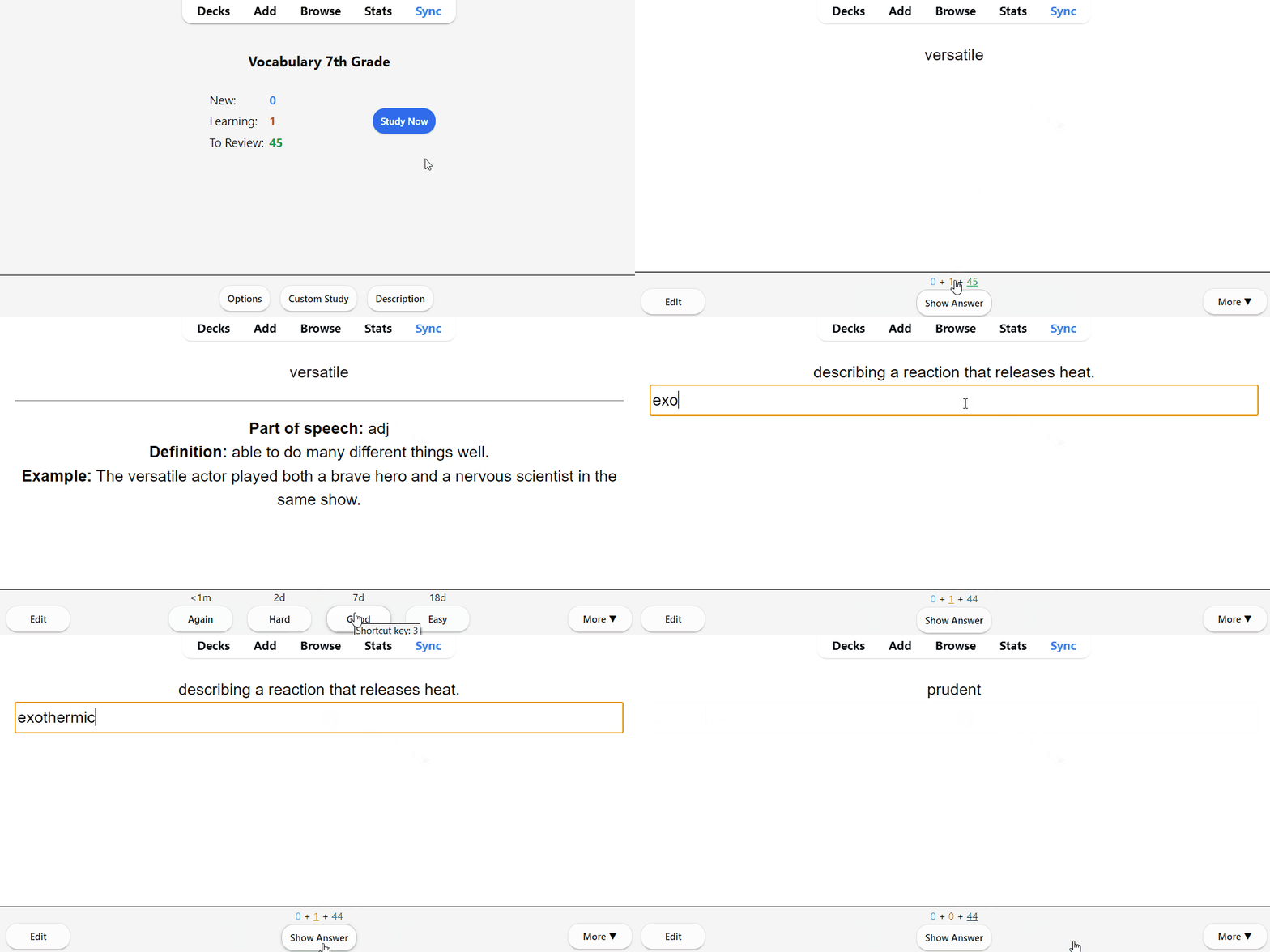
- What: Each week, I load the basic cards for our new batch of words and the type-in answer cards for the previous week’s words. That makes at least 30 cards each week to study, but usually more since it’s rare to have aced every card from further past weeks immediately. Kiddo "clears the deck" in Anki two to three times per week, with the first session being the long one introducing new cards and reviewing trouble spots from past weeks - then further sessions being a review of just the words that gave her trouble recently. If word memorization is challenging for your student, short daily reviews will ensure they practice problem vocabulary frequently enough to improve in the space of a week.
- Outcomes: Anki’s algorithm builds familiarity with unfamiliar terms and encourages retention by timing the reviews at ideal intervals. In addition the basic flash cards, the type-in answer cards reinforce spelling and verify retention with immediate feedback after the first week of practice on new words.
- Investment: It’s up to you how much time to invest in reviewing your student’s ratings each session - if you’re confident that they are giving accurate ratings, you can be fairly hands-off and just watch out for the deck starting to bloat from cards that haven’t gotten familiar (”easy” in Anki terms) yet. Anki offers plenty of flexibility in interval configuration on top of its algorithm, so as kiddo has used it we've tweaked the settings to try and ensure more engaging study. We've also figured out that after a few weeks we need to suspend the oldest cards to avoid being greeted by heaps of review all at once.
- Caveats: Anki is most popular with med school students, and so some of the app design caters to huge learning loads with multiple facets. You can keep it simple at first and use the default settings and simplest card types, but there is some amount of fighting with the system design that you may encounter as a user with different needs than the typical aspiring doctor. I consider the app’s features to be well worth coping with some awkwardness, but there are other flash card systems (including pen and paper if you like) that might work better for you.
4- Periodically test knowledge.
- Who: Student and Teacher
- How: ChatGPT and Wayground
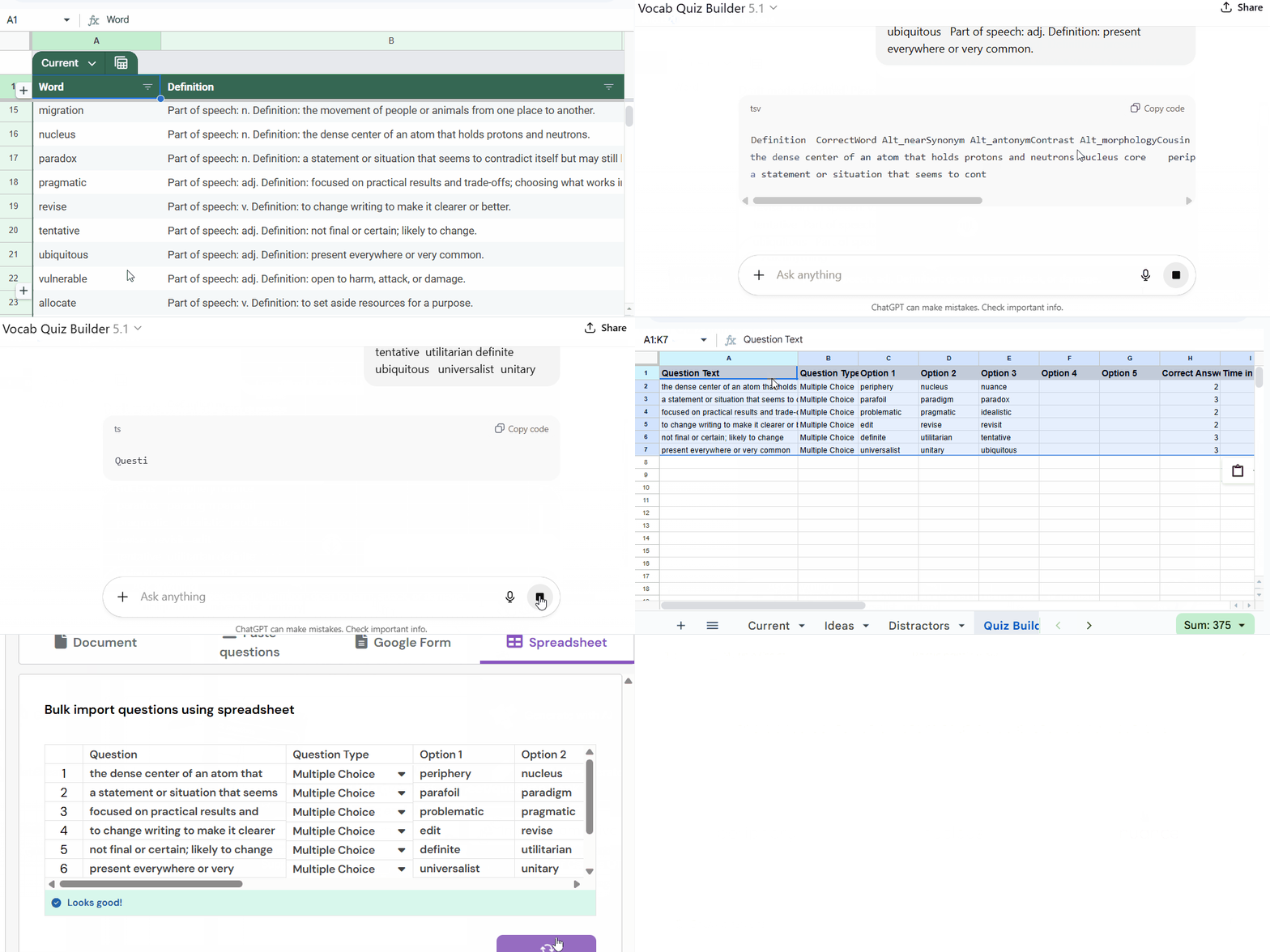
- What: After a few weeks, I like to give a three-choice quiz on past words that kiddo seems to have mastered according to her ratings and the type-in card results. I’ll make a table with the words I want to test and the definitions we’ve used, and provide these to a custom GPT that I’ve instructed to use a matrix of rules to suggest “distractor” words to fill out other possible word answers for each definition. The rules require that distractors be loosely plausible (sound-likes, antonyms, related roots, etc) but distinctly less suitable than the real answer. I review the suggestions for each definition and select two to present in addition to the real answer based on my judgement of challenging but fair difficulty levels. After feeding these back into the custom GPT for all of the quiz definitions, the GPT is instructed to output the definitions and possible answers (in randomized order) in the format Wayground requires for a simple quiz import. The Wayground app takes the table from ChatGPT and provides the quiz interface, including many options for timing, retries, and gamification. When kiddo takes the quiz, she has immediate feedback per question on her accuracy and overall score.
- Outcomes: Checking knowledge with a multiple-choice quiz provides both student and teacher with validation of learning progress, and Wayground quizzes can be easily converted into practice games as well in case the student isn’t ready to demonstrate mastery yet.
- Investment: Using ChatGPT to create good alternate choices for the quiz and automatically generate the configuration for Wayground is the key to saving time here. Coming up with alternate words manually, randomizing their quiz positioning, and marking correct answers is all achievable without technology tools, but after spending a few hours setting them up, I feel they save an hour or more every time we do a quiz. I strongly recommend using a custom GPT to hold the rules for creating quiz options consistently, which may require a ChatGPT subscription. Wayground’s free account enables all the functionality I consider essential, but paid accounts get more options you might want.
- Caveats: Quizzing isn’t perfect, so it’s important to use the results as informational rather than authoritative. If the scores are way off compared to the ratings a student is giving in Anki, it’s worth reviewing the appropriate criteria for rating.
Are you using technology in your homeschool strategy for vocabulary building? Let me know about what has worked (and hasn't) for you.
There's so much more for Supporters! I share my actual configurations, demos, and templates for you to try out and customize in the Premium article companion here.